
App Overview
Pay Screen Overview
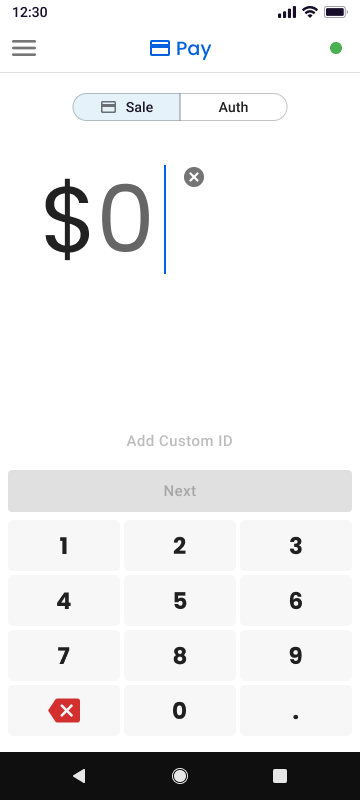
After logging in, you will be directed to the Pay screen. This is the default screen used to process payment transactions.
At the top of the Pay screen, you will see two transaction options:
- Sale: Processes a payment immediately.
- Auth: Authorizes a payment amount on the customer’s card without capturing the funds immediately.
To select a transaction type, tap either Sale or Auth. The selected option will determine how the transaction is processed.
App Navigation Overview
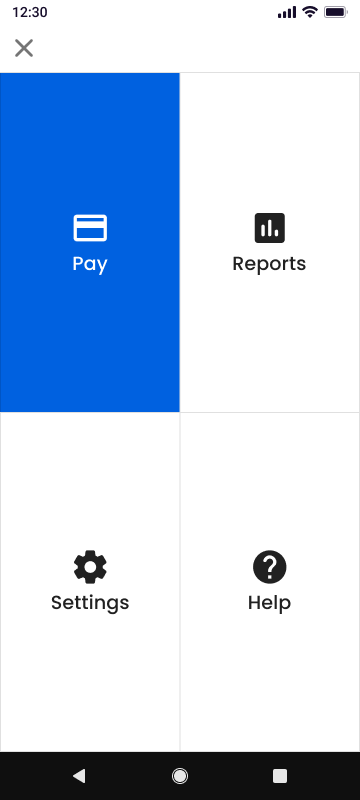
The main navigation menu allows you to access other areas of BluePOS Go.
To open the navigation menu:
- Tap the menu icon (☰) located in the corner of the Pay screen.
- The navigation menu will appear displaying the main sections of the app.
The navigation menu includes the following options:
- Pay: Return to the Pay screen to process transactions.
- Reports: View transaction history and reporting information.
- Settings: Manage application and account settings.
- Help: Access support resources and assistance.
Select any option from the menu to navigate to that section of the app.
Updated 3 months ago
Did this page help you?