
ORCA Configurations User Roles
User Roles for Managing ORCA Configurations
Overview
Managing ShieldConex® ORCA configurations represents a critical security responsibility within any payment ecosystem.
This capability should be restricted to highly privileged system-level roles due to the sensitive nature of the data and operations involved.
NoteOnly the merchant user with the direct internal relationship with Bluefin is allowed to manage ORCA configurations.
Any of the lower-level user roles cannot access or manage ORCA configurations.
To get a better understanding of how system-level roles compare to the rest of the user roles, check out the following hierarchy of organizations.
Hierarchy of Organizations
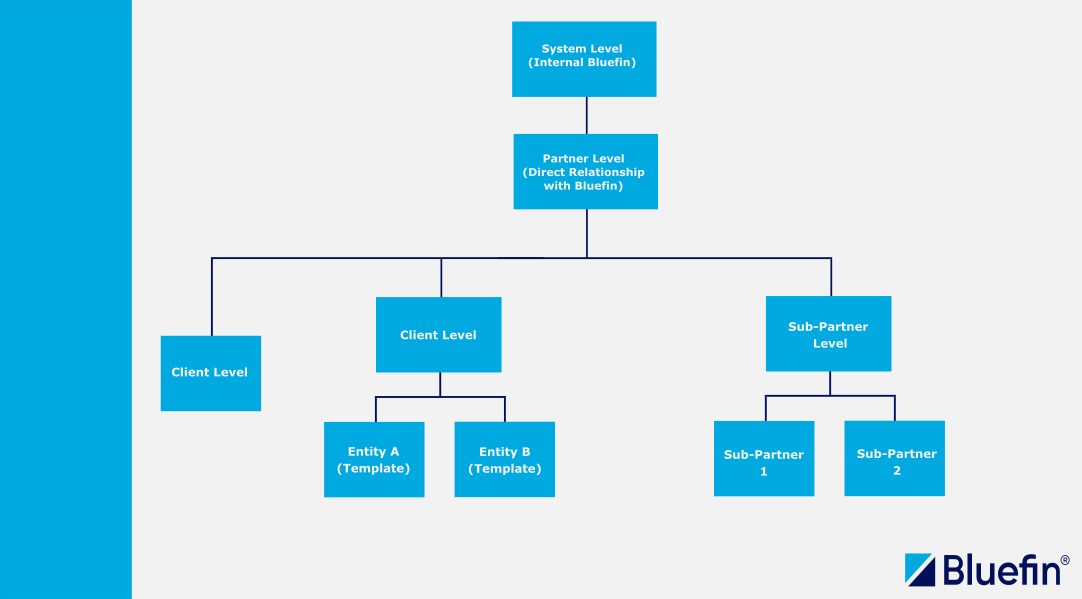
ShieldConex® Hierarchy Diagram of Organizations
NoteTo understand user roles in ShieldConex, make sure to fully understand the ShieldConex Manager APIs | Introduction.
Why This Restriction Matters
ORCA serves as a powerful proxy and orchestration layer that securely forwards, transforms, and routes critical payment data — including PCI (cardholder information) data, tokenized elements, PII, and PHI — to downstream payment processors, gateways, or partner systems.
Misconfigurations or unauthorized changes can have severe consequences including:
- Compliance and regulatory risks: ORCA configurations directly influence how data flows through the environment. Any malicious interactions may expand the organization's PCI scope, violate data protection standards (e.g., GDPR, CCPA, HIPAA), or result in audit failures.
- Security vulnerabilities: By modifying ORCA configurations, unauthorized access could allow attackers to redirect traffic, alter encryption behaviors, modify request/response transformations, or exfiltrate credentials stored in the ORCA Credentials Vault.
- Operational impact: Changes affect live transaction flows, processor switching, device integration, and cross-channel security (e-commerce, in-store, mobile), potentially causing downtime, failed payments, or degraded customer experience.
ShieldConex User Roles
Based on the defined user roles and their associated permissions in ShieldConex®, the ability to manage Users, Partners, Clients, and Templates is strictly controlled.
To further strengthen security and prevent unauthorized modifications as broken down in Why This Restriction Matters, we have applied the strictest system-level user roles to ShieldConex ORCA configurations.
This restriction ensures that lower-level partner roles — such as Partner Supervisors, Partner Users, and lower — cannot access or tamper with ORCA configurations. Only appropriately privileged system-level roles are permitted to create, modify, or manage ORCA configurations.
User Roles are designed to allow System Level users (and lower) to restrict other users and partners in their group, upholding a well-organized and secure structure of the hierarchy.
NoteUnderstanding these roles and permissions is crucial for effective management and operation within the system.
User roles allow you to control API permissions, manage actions in the ShieldConex Interface via the UI Portal, and maintain a secure organizational structure.
To understand user roles in ShieldConex, make sure to fully understand the ShieldConex | Hierarchy of Organizations.
ORCA Environment Flag
For ShieldConex, securing ORCA configuration is environment-based where in certification environment offers more flexibility with the optional configurable allowPartnerOrchestrationEditing flag.
This flag allows Partner Supervisors and Partner Users to interact with configurations in the certification environment, but not in production.
For all API and ShieldConex Portal environment URLs, refer to ShieldConex ORCA | Getting Started.
-
Partners can view/edit Orchestration Configs in the certification environment
- The field is environment-based and default to
FALSEif not found. - From the ShieldConex Portal Management Menu, Orchestration Configurations list is accessible and visible to Partner Supervisors but is restricted to the current partner's scope.
-
To fully understand the restrictions described, refer to the Hierarchy of Organizations and ShieldConex Portal Management Menu
-
Other restrictions include
- Filters in the list view only show Partners and Sub-Partners available to your account
- The orchestration detail view only displays data for the currently logged-in Partner
- Client lists are automatically limited to the selected Partner or Sub-Partner
-
- The field is environment-based and default to
-
Partners and lower (Clients) cannot view/edit ORCA configurations in production
- For maximum security, this setting has been fully revoked. Consequently, Partner roles and all lower-level users are strictly prohibited from viewing or modifying any ShieldConex ORCA configurations.
- The
allowPartnerOrchestrationEditingflag is always set tofalsein this case.
When this setting is configured to false, the Orchestrations option will no longer appear in the Management Menu, and the page will be inaccessible via the direct URL https://portal.shieldconex.com/manage/proxy-configurations.
For all API and ShieldConex Portal environment URLs, refer to ShieldConex ORCA | Getting Started.
ShieldConex Portal Management Menu
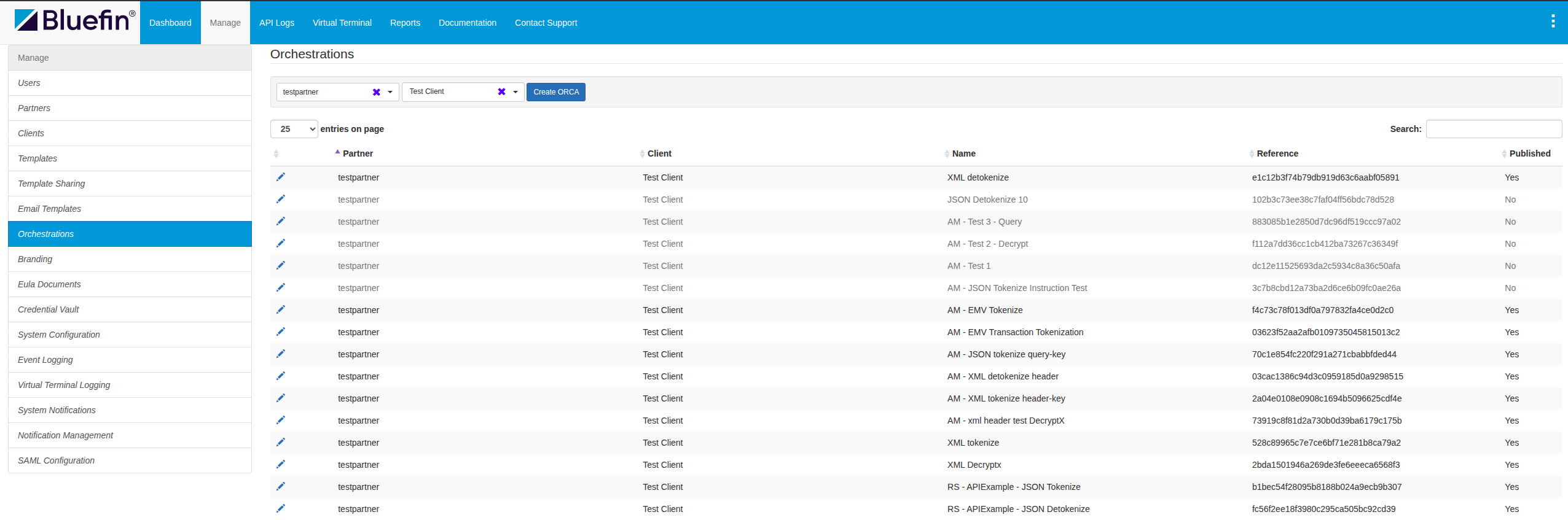
ShieldConex® Portal Management Menu
Updated 3 months ago