
Overview
PayConex includes an application-level IP Blocking feature designed to help merchants prevent fraudulent or abusive transactions. Unlike network firewalls, this mechanism does not stop API access — instead, it evaluates each transaction against configured IP rules to decide whether to accept or decline it.
Merchants can maintain their own lists of blocked IP addresses, and can choose how PayConex determines the "client IP" for each request (either the connection IP, or a remote IP supplied in the ip_address field).
This depends on the following three options available from your PayConex account:
- Incoming Only (default): Uses the detected client IP from headers.
- Remote Only: Uses only the IP provided as your request parameter.
- Remote Preferred: Uses the request parameter if present, otherwise defaults to the detected IP.
NoteThe merchant specifies to the IP Blocking feature which IP address to use in order to analyze for potential fraud.
This gives merchants more control when operating behind proxies, load balancers, or other networking setups.
IP blocking is commonly used to restrict transactions from specific countries, known fraud sources, or previously flagged addresses, and can be combined with other fraud prevention tools within PayConex.
For more information and basic strategies to reduce eCommerce Fraud, make sure to refer to and comprehensively cover PayConex™ | Fraud Prevention as it fits with your integration.
NoteAs distinguished from the IP Whitelist management, IP blocking feature does not serve as a network firewall blocking the network access. Again, it rejects fraudulent or abusive transactions based on the configured IP Blocking rules.
With that in mind, PayConex offers the three separate protection services - all of which can be combined, maximizing on all security aspects of a payment gateway:
- IP Blocking Rules (Abusive transactions, rate limiting methods, abnormal and/or suspicious network activity, etc.)
- IP Whitelist Management (Network Firewall for the Payment Gateway)
- Fraud Detection and Prevention (PayConex™ | Advance Fraud Prevention Tools)
PayConex also utilizes a web application firewall (also known as a Cloud WAF) to help bolster security and accessibility to PayConex. This means PayConex can communicate via a number of different IP addresses.
For more details, see PayConex™ | PayConex IP Address Ranges.
Exposed/Compromised API Access Keys Scenario
Being one of the more common scenarios nowadays - if your API keys are ever exposed or compromised, the IP blocking feature especially plays a factor - adding a second layer of defense that limits what an attacker can do with it.
If someone gets hold of your PayConex API key, they could — in theory — send payment requests directly to the PayConex API from any machine on the internet.
Since API keys are a form of credential, PayConex would normally accept those requests if:
- The API key is valid, and
- IP blocking is not enforced for access-key calls (
Check Access Key Requestset toNO)
To customize and enhance this PayConex legacy/default behavior, refer to the Best Recipes and choose what is most optimal for your integration.
NoteNevertheless, an ISV should ensure this situation never occurs by following best general practices for securely retrieving and handling API access keys and other sensitive credentials.
The merchant can also rotate the compromised API key/s by deleting and creating a new API key. However, this breaks the merchant's existing integration and requires action on the application side.
Configuring IP Blocking Rules
To configure IP Blocking rules for your PayConex Integration, go to Settings, scroll down to Security Features, and enable Card Checking / IP Blocking to see all of the IP Blocking rules that PayConex Payment Gateway offers at the merchant's disposal.
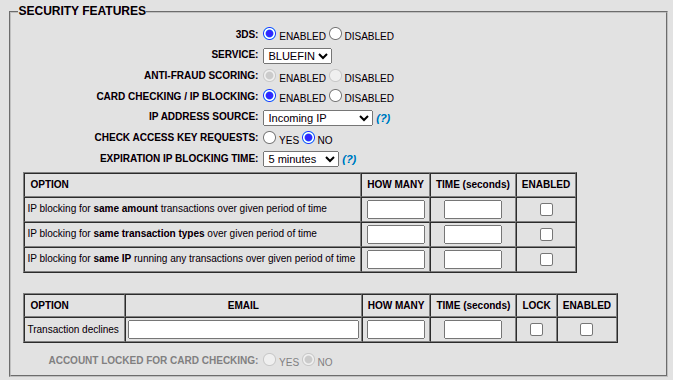
PayConex™ Portal | Configuring IP Blocking Rules
To see the full breakdown of these options, read on and dive into the Best Recipes and Advanced IP Blocking and Rate Limiting Options.
Managing IP Blockist
The merchant has the ability to manually filter, block or unblock IP addresses caught by the IP Blocking Rules.
This can be achieved by going to Settings -> MANAGE IP BLOCKLIST from the PayConex Portal.
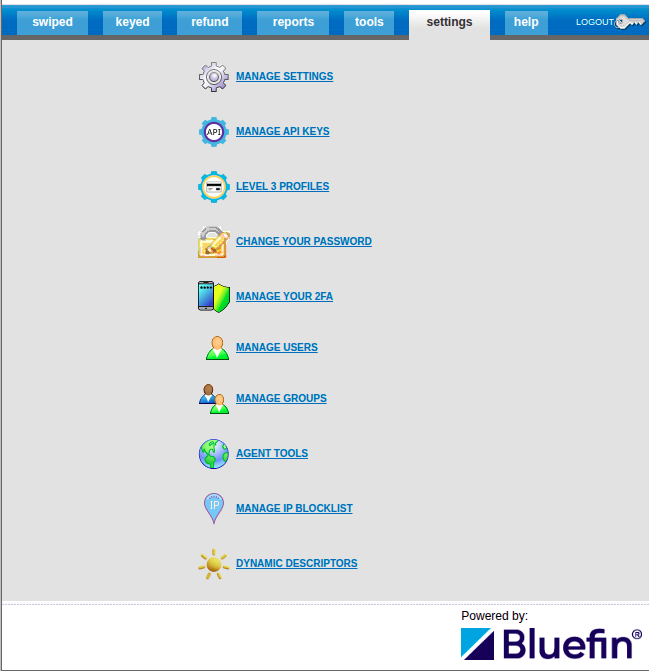
PayConex™ Portal | Managing IP Blockist
Best Recipes
To ensure maximum security for your PayConex Integration, here are some of the best (most practical) recipes that capitalize on the combination of IP Blocking Feature and IP Whitelist Management.
Check Access Keys and IP Whitelist Management
This recipe implements the following PayConex account configuration:
-
IP Blocking Rules -
Check Access Key Requestsset toYes-
IP blocking rules are enforced even for authenticated API requests. That means PayConex will evaluate every incoming request — including those from your own backend servers — against its IP block rules.
- If an attacker tries to use the API access key from another IP, the request fails at the gateway level.
- In other words, the attacker's requests are automatically rejected before any transaction is processed.
- If an attacker tries to use the API access key from another IP, the request fails at the gateway level.
-
This ensures (potentially) compromised keys cannot be used from unknown environments.
-
-
IP Whitelisting - Adding the merchant server IP address via
IP Whitelist ManagementTool- To avoid blocking your own servers and prevent evaluating every incoming request as mentioned in the previous step, the merchant can use the IP Whitelist Management tool to exempt their backend server IPs.
- Whitelisted IPs are exempt from IP blocking rules, allowing uninterrupted communication with the PayConex Gateway.
- The Whitelist Status must be set to
Partialwith the IP address of the merchant server added to avoid triggering the IP Blocking Rules against the whitelisted addresses. For more, see IP Whitelist Management.
- To avoid blocking your own servers and prevent evaluating every incoming request as mentioned in the previous step, the merchant can use the IP Whitelist Management tool to exempt their backend server IPs.
-
Fraud Prevention Tools - Passing
ip_addresswithRemote OnlyorRemote Preferredconfiguration- For enhanced fraud screening, include the actual customer's IP in your transaction request.
- This allows PayConex to distinguish between merchant-originated and customer-originated requests and apply its fraud filters accordingly.
- It is important to note this does not necessary fall into the IP Blocking rules but, rather, fraud detection purposes that is combined with other fraud prevention tools within PayConex.
- Compare
Remote OnlyandRemote Preferredin the Overview. - To see how to pass
ip_addressin a transaction request, check out Including Customer IP in Transaction Request example below.
- Additional Merchant Server Network Protection (Optional)
- Utilize your server infrastructure with one or more of the following network integrations:
- CDN, firewalls, Virtual Networks, Front Doors, NAT Gateways, and other layered protections for inbound access and outbound traffic
- For example, if there is a TCP/IP spoofing attack, these network integrations help conceal the actual IP address of the backend server and prevent unauthorized access from the backend server if there is, even, a slight chance an attack is somehow able to spoof the server's IP address. Either way, the PayConex Payment Gateway uses WAF to reduce the risk of such spoofing by rejecting the TCP handshakes before any significant damage occurs.
- CDN, firewalls, Virtual Networks, Front Doors, NAT Gateways, and other layered protections for inbound access and outbound traffic
- Utilize your server infrastructure with one or more of the following network integrations:
Maximizing on IP Blocking ConfigurationIt is optimal that the merchant enhances their IP Blocking configuration by making the most use of Advanced IP Blocking and Rate Limiting Options.
API Key Rotation & IP Blocking
-
Regularly rotate your API keys and immediately revoke unused ones.
-
Link API Key Rotation to the backend key vault with managed identity credentials so that the API access keys fetched from your backend server are always up-to-date. It is generally recommended that the key vault is (private) isolated, and tied to the corresponding Virtual Network of the backend server, composing an advanced and secure network architecture.
-
Combine rotation with IP blocking rules to ensure that even temporarily exposed keys cannot be exploited from unknown sources.
Staging/Test Environment Isolation
- Maintain separate API credentials and IP configurations for testing environments.
- Use IP blocking to ensure your test systems can only reach sandbox endpoints, preventing accidental or malicious cross-environment traffic.
Advanced IP Blocking and Rate Limiting Options
Any of these options can be additionally combined with the recipes above so that the merchant can further enhance the IP Blocking rules according to their needs. Please, revisit Configuring IP Blocking Rules above.
PayConex provides advanced IP blocking options that allow merchants to control transaction behavior based on request frequency and patterns. These settings help prevent automated attacks, fraud attempts, or accidental request loops.
Bluefin SupportIf you are having trouble coming up with the suitable set of rules, please consult Bluefin Integrations Team as per your specification.
Expiration IP Blocking Time
Default: 5 minutes
This setting defines how long a specific IP address remains blocked after triggering one of the IP blocking rules below.
For example, if an IP exceeds the allowed transaction threshold, it will be temporarily blocked for the duration of the expiration period.
TipA shorter expiration period (e.g., 5 minutes) allows for quick automatic recovery from accidental overuse, while longer periods (e.g., 30–60 minutes) provide stronger protection against repeated automated attacks.
IP Blocking Rules
| Option | Description | Key Parameters |
|---|---|---|
| IP blocking for same amount transactions over given period of time | Prevents repeated transactions with the exact same amount from the same IP address within a defined time window. This is useful against card testing or brute-force attempts using fixed amounts. | How many: Number of allowed identical-amount transactions. Time (seconds): Time window during which PayConex monitors the IP activity. |
| IP blocking for same transaction types over given period of time | Limits how many transactions of the same type (e.g., SALE, AUTH, REFUND) can be processed from the same IP in a given timeframe.This helps identify abnormal usage patterns or repeated operation types. | How many: Allowed number of same-type transactions. Time (seconds): Duration of monitoring window. |
| IP blocking for same IP running any transactions over given period of time | Sets a general transaction rate limit per IP, regardless of amount or type. Prevents excessive traffic from a single IP address. | How many: Allowed total transactions. Time (seconds): Duration of monitoring window. |
Decline Threshold Rules
| Option | Description | Key Parameters |
|---|---|---|
| Transaction declines | Automatically locks or alerts based on the number of consecutive declines from a specific IP address within a time window. This helps detect fraudulent or malfunctioning systems repeatedly submitting invalid card data. | Email: Notification address for alerts. How many: Number of decline attempts before triggering action. Time (seconds): Monitoring window. Lock: Whether to temporarily block the IP after threshold is reached. |
NoteAt least, one IP blocking rule must be configured in order to Update Settings successfully with
Card Checking / IP Blockingenabled.
Including Customer IP in Transaction Request
As an ISV using either Remote Only or Remote Preferred, the customer IP address can be included in a Payconex transaction in the following way:
curl --request POST \
  --url https://cert.payconex.net/api/qsapi/3.8 \
  --header 'Content-Type: application/x-www-form-urlencoded' \
  --data account_id=220614966801 \
  --data api_accesskey=32d42f0f0b6c89616d42aed8c96801e6 \
  --data response_format=JSON \
  --data tender_type=CARD \
  --data transaction_type=SALE \
  --data transaction_amount=10.00 \
  --data card_number=4444333322221111 \
  --data card_expiration=1230 \
  --data ip_address=192.0.2.123
NoteThe IP address sent as
ip_addressis used for fraud detection and is included as transaction metadata.
Response Example
{
  "transaction_id": "000000087167",
  "tender_type": "CARD",
  "transaction_timestamp": "2025-11-10 06:52:22",
  "card_brand": "VISA",
  "transaction_type": "SALE",
  "last4": "1111",
  "bfid": "djI6M...",
  "scx_token_card_expiration": "9929",
  "scx_token_card_number": "5850459886792406",
  "card_expiration": "1230",
  "authorization_code": "OK1252",
  "authorization_message": "APPROVED",
  "request_amount": 10,
  "transaction_amount": 10,
  "ip_address": "192.0.2.123",
  "keyed": true,
  "swiped": false,
  "entry_mode": "keyed",
  "transaction_approved": true,
  "reason_code": "000",
  "network": "VISA",
  "currency": "USD",
  "error": false,
  "error_code": 0,
  "error_message": null,
  "error_msg": null
}
Transaction Metadata
By getting the transaction metadata with the ip_address, we get the following:
curl --request POST \
  --url https://cert.payconex.net/api/rsapi/3.8 \
  --data account_id=220614966801 \
  --data api_accesskey=32d42f0f0b6c89616d42aed8c96801e6 \
  --data response_format=JSON \
  --data transaction_id=000000087167 \
  --data include_fields=ddds_version,ddds_eci,ddds_dstransid,ddds_authenticationvalue,ddds_status,ddds_protected,anti_fraud_recommendation,ip_address
Response
{
  "api": "RSAPI",
  "version": "3.8",
  "count": 1,
  "transactions": [
    {
      "transaction_id": "000000087167",
      "account_id": "220614966801",
      "authorization_date": "2025-11-10 06:52:22",
      "tender_type": "CARD",
      "transaction_type": "SALE",
      "transaction_amount": 10,
      "ip_address": "192.0.2.123",
      "ddds_version": "2.2.0",
      "ddds_eci": "05",
      "ddds_dstransid": "2abe7b65-45cd-4a58-bcd3-8b10b8f8f50e",
      "ddds_authenticationvalue": "ji+A0S72pd/RFOrr1fwCKXKqDno=",
      "ddds_status": "Y",
      "ddds_protected": "Yes",
      "anti_fraud_recommendation": null
    }
  ]
}
IP Whitelist Management
By going to Tools -> IP WHITELIST MANAGEMENT, our merchants can now utilize the IP Whitelist management tool in different ways:
-
Disabled - the whitelisting of an IP address will be ignored
-
Partial – IPs listed can process; others will be subjected to IP blocking set preferences
-
Full - only the IPs listed can process transactions
-
Note
The most critical downside of using
Fullpreference is that all customers interacting with PayConex™ Hosted Payment Forms will be blocked unless their specific IP address is included in the IP Whitelist. Doing so is strongly ill-advised as the merchant must, in advance, obtain and whitelist IP addresses of all of their customers.
-
This selection is available through the Whitelist status selection box.
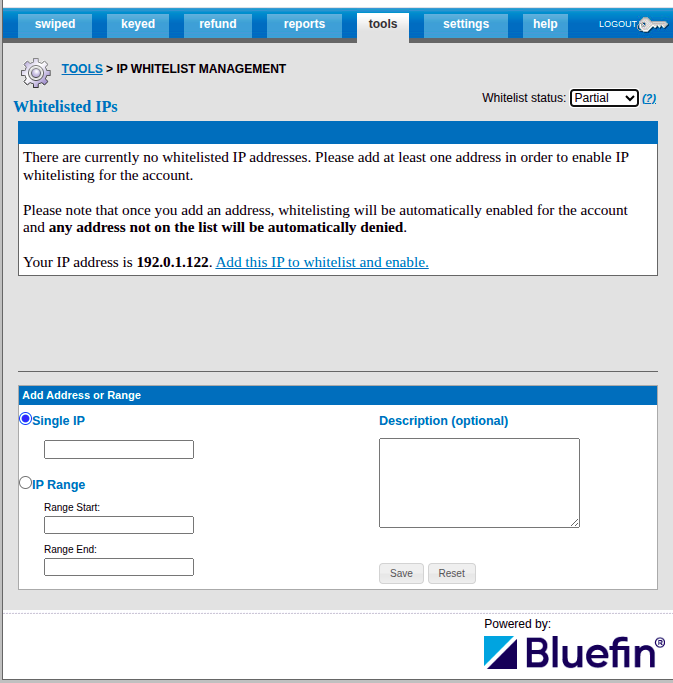
PayConex™ Portal | IP Whitelist Management
NoteUnder the reports tab, we have a Whitelist Exceptions Report that shows traffic coming from addresses not whitelisted. This report is only visible if IP Whitelist Status is set to
Full/Partial.