
Usage Of External Transaction Identifiers in PayConex V4 API
Overview
In the PayConex V4 API, the external transaction identifier enables the merchant to specify their own unique identifier for either CP or CNP transactions.
NoteThis functionality falls into the Transaction Management category as it is possible to use the database entry
extTransactionIdfor either processing a CNP or CP transaction.Before checking out this page, make sure you are up to speed with:
Configuration Settings
Depending on your business/integration requirements, the PayConex Portal allows you to choose one of the following three behaviors for handling extTransactionId:
Replay Original Response: Return Original Transaction (Replay Behaviour)
Replay Original Response: Return Original Transaction (Replay Behaviour)If a duplicate extTransactionId is received, the system returns the details of the originally authorized transaction (idempotency mode).
- The API includes the property
"replayed": truein the response to indicate that it has returned the metadata of the original transaction instead of processing a new one.
Reject Duplicate IDs
Reject Duplicate IDsIf a duplicate extTransactionId is detected, the request is rejected with an error. This is the strictest setting.
- Similar to the PayConex
transactionId, the extTransactionId can be a unique, one-time identifier. - It must be unique for each transaction — you cannot reuse the same extTransactionId across multiple transactions.
- The merchant is responsible for ensuring their identifier generation logic always produces unique values.
- Recommendation: Use a reliable method such as UUIDs, a combination of timestamp + sequence number, or your internal order/invoice ID system to guarantee uniqueness.
Replay Approvals; Retry Failures: Retry on Decline/Failure (Retry Behaviour)
Replay Approvals; Retry Failures: Retry on Decline/Failure (Retry Behaviour)If the original transaction was declined or failed, this mode enables you to attempt to re-run the authorization (Sale or Auth) using the same extTransactionId as a new payment attempt using the new request details. Otherwise, the transaction never proceeds to the authorization and returns an error message indicating that the transaction has already been processed.
- The extTransactionId is particularly effective for implementing safe transaction retries.
- While giving you flexibility to retry in case of temporary failures, this design never generates potential duplicate charges and prevents any double-processing in success cases.
- The most common scenario for this is the offline transaction use case described below.
Account administrators can configure how PayConex handles duplicate external transaction ID values at the account level:
- Reject Duplicate IDs (default)
- Replay Original Response
- Replay Approvals; Retry Failures
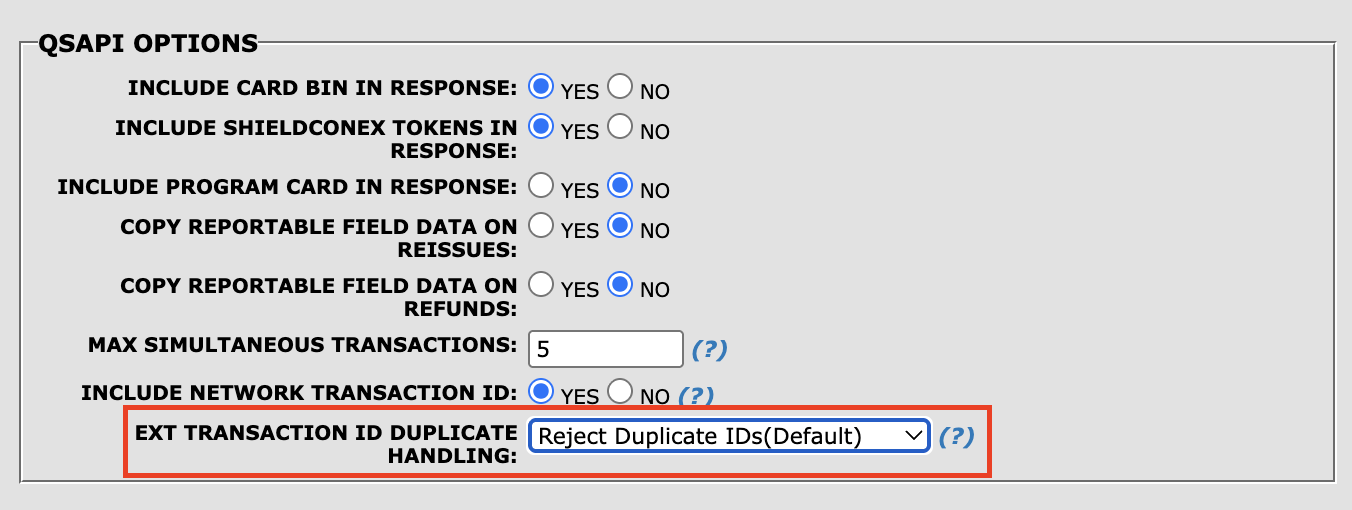
PayConex Portal | Account administrator control for External Transaction ID handling
Configuration SetupOnce you have chosen the desired option, you can enable and use only one option at a time.
For assistance with selecting the best option for your needs and having it properly configured, please contact the Bluefin Integrations Team at [email protected].
Understanding the Different Transaction Identifiers
| Identifier | Generated By | Purpose | Key Characteristics |
|---|---|---|---|
| transactionId | PayConex | Primary identifier for all transactions in PayConex | System-generated, unique, immutable |
| customId | Merchant | Used solely for reporting and search purposes | Unique per transaction, great for your internal references |
| extTransactionId | Merchant | Advanced transaction management within the PayConex Payment Gateway | More powerful; supports advanced operations and customized workflows such as Offline Transactions below |
Consistent Use of the External Transaction IdentifierEven if you are already using
extTransactionIdin your current flows, we recommend applying it consistently to all transactions regardless of the use case (see below).This creates a uniform approach that simplifies development, debugging, and long-term transaction management.
Assigning External Transaction Identifier
Via trace.extTransactionId in a POST request, the external transaction identifier can be assigned during:
- Transaction Initialization
- CNP | Processing a Sale/Authorization
- CP | Sale/Authorization Transactions
Transaction Initialization
POST /api/v4/accounts/{accountId}/payments/init
{
  "description": "Pre-fetched transaction #01",
  "trace": {
    "extTransactionId": "myid_0001234567"
  },
  "customer": {
    "name": "Alice",
    "billingAddress": {
      "address1": "address1",
      "address2": "address2",
      "city": "Kansas City",
      "state": "MO",
      "zip": "90210",
      "country": "USA",
      "company": "Acme Inc."
    }
  },
  "shippingAddress": {
    "address1": "address1",
    "address2": "address2",
    "city": "Kansas City",
    "state": "MO",
    "zip": "90210",
    "country": "USA",
    "company": "Acme Inc.",
    "recipient": "Alice Smith"
  }
}
*Required Scopes: pcx:payments:*, pcx:payments:create
Subsequent Sale/AuthorizationFor a subsequent sale/authorization based on the transaction initialization, see the Transaction Workflow below.
CNP Sale Transaction
POST /api/v4/accounts/{accountId}/payments/sale
{
  "trace": {
    "extTransactionId": "myid_00012345"
  },
  "posProfile": "ECOMMERCE",
  "amounts": {
    "total": "10.01",
    "currency": "USD"
  },
  "bfTokenReference": "PAYCONEX_TOKEN"
}
*Required Scopes: pcx:payments:*, pcx:payments:card_not_present:*, pcx:payments:card_not_present:sale
Device/CP Sale Transaction
POST /api/v4/accounts/{accountId}/payments/device-sale
{
  "trace": {
    "extTransactionId": "myid_000123456"
  },
  "credentialOnFile": {
    "scheduleIndicator": "UNSCHEDULED"
  },
  "tenderType": "CREDIT",
  "entryMode": "KEYED",
  "posProfile": "ATTENDED_ON_PREM_POS",
  "deviceProfile": "PAX_A80",
  "amounts": {
    "currency": "USD",
    "total": "27.50"
  },
  "card": {
    "expiry": "1230",
    "p2pe": {
      "cvv": "BC53B84FA4B8F12C",
      "ksn": "FFFF9876540002400195",
      "pan": "B3804311123638D"
    },
    "masked": {
      "pan": ""
    }
  },
  "device": {
    "type": "A920",
    "serial": "0820617507",
    "app": "BluePOS",
    "appVersion": "1.0.0",
    "osVersion": "PayDroid 6.3",
    "capabilities": "E0F8C8"
  }
}*Required Scopes: pcx:payments:*, pcx:payments:device:*, pcx:payments:device:sale
🚧 extTransactionId Validation Rules
extTransactionId Validation RulesThe extTransactionId can contain alphanumeric characters, hyphens (-), and underscores (_).
It must match the following regular expression:
^[A-Za-z0-9._-]+$Allowed characters:
- Uppercase letters:
A–Z - Lowercase letters:
a–z - Numbers:
0–9 - Hyphen:
- - Underscore:
_ - Dot:
.
Examples of valid extTransactionId include:
extTransactionId include:-
ORDER-12345 -
INV_20260429_001 -
STORE05-REFUND-987 -
offline_txn_abc123 -
MY.OFFLINE.TXN.001 -
myid_0001234567
The extTransactionId must be at least 1 character and no more than 50 characters in length.
{
  "message": "Request validation error: Does not conform to API schema.",
 "errorCode": "40001",
  "errorType": "invalid_request",
 "source": "Request",
  "value": null,
  "traceId": "4734bd16-bc32-483e-be9a-365aa7dea5dc",
  "details": [
    {
      "source": "$.trace.extTransactionId",
      "value": "",
      "message": "Payload schema violation: minimum string length is 1"
    }
  ]
}{
"message": "Request validation error: Does not conform to API schema.",
"errorCode": "40001",
"errorType": "invalid_request",
"source": "Parameter",
"value": null,
"traceId": "8ad799a8-bf08-4a29-9415-e1cc1e330887",
"details": [
{
"source": "Path Parameter",
"value": "myid_000123456_100000000000000000000...",
"message": "Invalid value for path parameter \"extTransactionId\": maximum string length is 50"
}
]
}If an extTransactionId with invalid characters is provided, the V4 API returns the following error message:
{
  "message": "Request validation error: Does not conform to API schema.",
  "errorCode": "40001",
  "errorType": "invalid_request",
  "source": "Request",
  "value": null,
  "traceId": "0663610a-8f92-4988-b3ce-8a63139a05b1",
  "details": [
    {
      "source": "$.trace.extTransactionId",
      "value": null,
      "message": "Payload schema violation: string doesn't match the regular expression \"^[A-Za-z0-9._-]+$\""
    }
  ]
}
Getting Transaction by External Transaction ID
GET /api/v4/accounts/{accountId}/payments/by-ext-transaction/{extTransactionId}
*Required Scopes: pcx:payments:*, pcx:payments:read
Same Permission ScopesNote that this endpoint shares the same permission scopes as Getting Transaction Metadata via transactionId.
This endpoint retrieves the full transaction metadata using the merchant-supplied extTransactionId instead of the PayConex transactionId.
It behaves exactly the same as the standard Get Transaction Metadata endpoint:
- It returns the identical response structure and data.
- It shares the same permission scopes.
This endpoint is especially useful when you want to look up a transaction using your own external identifier.
For the full response object, refer to API Reference | Retrieve transaction by external transaction ID.
If no transaction is found under the specified extTransactionId, the V4 API returns the following response with HTTP 404.
For all the general error response codes, check out API Endpoint Overview | General V4 Error Response Codes.
{
  "message": "The requested entity was not found",
  "errorCode": 40004,
  "errorType": "not_found",
  "source": "Transaction",
  "value": "unknown",
  "traceId": "815e4e93-5c01-4f80-b559-ef79b5c746b7",
  "details": []
}
Return Original Transaction | Replay
With Return Original Transaction mode enabled, the Sale/Authorization endpoint does not reject duplicate extTransactionId requests. It simply returns the metadata of the original (authorized) transaction instead with the replayed property.
This level of flexibility ensures the idempotency of the transaction with a final status (CAPTURED, AUTHORIZED, DECLINED, FAILED, or another payment state).
For all of the transaction statuses, refer to Transaction Metadata | Status.
For example, let's say our first usage of myid_12378 is in the following sale transaction.
Request
POST /api/v4/accounts/{accountId}/payments/sale
{
  "trace": {
    "extTransactionId": "myid_12378"
  },
  "posProfile": "ECOMMERCE",
  "amounts": {
    "total": "12.00",
    "currency": "USD"
  },
  "bfTokenReference": "PAYCONEX_TOKEN"
}
*Required Scopes: pcx:payments:*, pcx:payments:card_not_present:*, pcx:payments:card_not_present:sale
Since no such extTransactionId exists, the PayConex Payment Gateway will process/authorize that sale transaction request.
Response
{
  "transactionId": "000000095366",
  "status": "CAPTURED",
  "timestamp": "2026-05-05T14:03:29.000000Z",
  "trace": {
    "sourceIp": "10.18.5.139",
    "history": [
      {
        "action": "transaction",
        "requestId": "3b8ed743-ff00-4ebe-95e0-62169494c704",
        "correlationId": "f6d1aaaf-2b6b-4265-a47d-4aa04716636f",
        "timestamp": "2026-05-05T09:03:26-05:00"
      }
    ],
    "networkTransactionId": "016125521395965G087",
    "extTransactionId": "myid_12378"
  },
  "amounts": {
    "currency": "USD",
    "approved": "12.00",
    "requested": "12.00",
    "balance": "12.00"
  },
  "auth": {
    "code": "OK0213",
    "processorMessage": "APPROVED",
    "message": "APPROVED",
    "networkName": "VISA",
    "avsResponseCode": "Y"
  },
  "card": {
    "name": "Alice",
    "last4": "1111",
    "expiry": "1226",
    "brand": "VISA"
  },
  "binData": {
    "program": "UNKNOWN"
  },
  "transactionType": "SALE",
  "entryMode": "KEYED",
  "refundObject": {
    "refundBalance": "12.00"
  }
}
Request
If we now try to process another sale transaction under the same extTransactionId (regardless of the amount and bfTokenReference), the V4 API returns the same original (authorized) transaction if we compare the transactionIds.
NoteThe API includes the property
"replayed": truein the response to indicate that it has returned the metadata of the original transaction instead of processing a new one.
POST /api/v4/accounts/{accountId}/payments/sale
{
  "trace": {
    "extTransactionId": "myid_12378"
  },
  "posProfile": "ECOMMERCE",
  "amounts": {
    "total": "10.00",
    "currency": "USD"
  },
  "bfTokenReference": "PAYCONEX_TOKEN"
}
*Required Scopes: pcx:payments:*, pcx:payments:card_not_present:*, pcx:payments:card_not_present:sale
Response
{
  "transactionId": "000000095366",
  "status": "CAPTURED",
  "timestamp": "2026-05-05T14:03:29.000000Z",
  "trace": {
    "sourceIp": "10.18.5.139",
    "history": [
      {
        "action": "transaction",
        "requestId": "3b8ed743-ff00-4ebe-95e0-62169494c704",
        "correlationId": "f6d1aaaf-2b6b-4265-a47d-4aa04716636f",
        "timestamp": "2026-05-05T09:03:26-05:00"
      }
    ],
    "networkTransactionId": "016125521395965G087",
    "extTransactionId": "myid_12378",
    "replayed": true
  },
  "amounts": {
    "currency": "USD",
    "approved": "12.00",
    "requested": "12.00",
    "balance": "12.00"
  },
  "auth": {
    "code": "OK0213",
    "processorMessage": "APPROVED",
    "message": "APPROVED",
    "networkName": "VISA",
    "avsResponseCode": "Y"
  },
  "card": {
    "name": "Alice",
    "last4": "1111",
    "expiry": "1226",
    "brand": "VISA"
  },
  "binData": {
    "program": "UNKNOWN"
  },
  "transactionType": "SALE",
  "entryMode": "KEYED",
  "refundObject": {
    "refundBalance": "12.00"
  }
}
Offline Transactions
While the extTransactionId can be used for either Card-Present (CP) or Card-Not-Present (CNP) transactions, one of its most valuable use cases is supporting offline transactions on payment terminals.
In order to capitalize on the offline transactions use case, the most effective configuration setting is Retry on Decline/Failure. This allows the merchant to retry processing a transaction during the next processing cycle in case the transaction has been temporarily declined or failed.
NoteBecause offline transactions carry additional risk, it is the merchant's responsibility to decide whether to enable this use case.
A customer may present a card that has insufficient funds or would otherwise be declined at POI. With offline support enabled, the merchant can queue the transaction and retry authorization once connectivity is restored, potentially completing the charge at a later time.
The failed transaction statuses include:
| Value | Description |
|---|---|
"DECLINED" | The transaction was declined. |
"FAILED" | The transaction failed. |
For all of the transaction statuses, refer to Transaction Metadata | Status.
Offline Mode Scenario
When a terminal loses connectivity (either due to network issues or manual offline mode), merchants can continue accepting payments securely.
Here is the breakdown of this use case:
- The terminal (especially P2PE devices) can still read card data at POI/POS and generate the P2PE encrypted payment payload at the hardware level.
- The merchant's offline middleware or SDK generates a unique
extTransactionIdfor each transaction. - All transaction metadata and the encrypted payload are stored locally in an offline queue.
- Once the terminal goes back online, the queued transactions are processed (via either Sale or Authorization) using the stored
extTransactionId.- It is important to note that it is entirely up to the merchant to decide where the offline transactions will be processed. For example, the processing can either take place from the device terminal itself or the server backend.
This approach ensures no transactions are lost during outages and provides reliable recovery.
PCI Scope RequirementOnce a transaction has been successfully processed, the merchant must immediately purge the local record containing the P2PE payload from their system.
This is a mandatory PCI DSS compliance requirement to minimize the storage of sensitive cardholder data.
Key Benefits
- Safe handling of transactions even when fully offline.
- Prevents duplicate processing thanks to the unique
extTransactionId. - The same
extTransactionIdcan later be used for reporting, reconciliation, and transaction lookup in the PayConex Payment Gateway.
Collecting Offline Transactions and Processing After Reconnecting
When a terminal operates in offline mode, transactions are securely stored locally in a queue so it can process the queued transactions efficiently once back online.
Let's say the device has queued the following transactions while in the offline mode.
{
  "offlineQueue": [
    {
      "tenderType": "CREDIT",
      "entryMode": "KEYED",
      "posProfile": "ATTENDED_ON_PREM_POS",
      "deviceProfile": "PAX_POINTCONEX",
      "amounts": {
        "currency": "USD",
        "total": "15.00"
      },
      "card": {
        "expiry": "1229",
        // P2PE Encrypted Payload generated by terminal on hardware-level
        "p2pe": {
          "cvv": "BC53B84FA4B8F12D",
          "ksn": "FFFF987654016B600344",
          "pan": "21A2F929CFB552BD84B5374D1123D165"
        }
      },
      "device": {
        "type": "A920",
        "serial": "0820617507",
        "app": "PointConex",
        "appVersion": "1.0.0",
        "osVersion": "PayDroid 6.3",
        "capabilities": "E0F8C8"
      },
      "trace": {
        // GENERATED BY THE MERCHANT OFFLINE SDK/MIDDLEWARE
        "extTransactionId": "OFFLINE-20260428-001"
      }
    },
    {
      "tenderType": "CREDIT",
      "entryMode": "KEYED",
      "posProfile": "ATTENDED_ON_PREM_POS",
      "deviceProfile": "PAX_POINTCONEX",
      "amounts": {
        "currency": "USD",
        "total": "10.00"
      },
      "card": {
        "expiry": "1230",
        // P2PE Encrypted Payload generated by terminal on hardware-level
        "p2pe": {
          "cvv": "BC53B84FA4B8F12C",
          "ksn": "FFFF987654016B600366",
          "pan": "20A1F829CFB552BD84B5374D1123D164"
        }
      },
      "device": {
        "type": "A920",
        "serial": "0820617507",
        "app": "PointConex",
        "appVersion": "1.0.0",
        "osVersion": "PayDroid 6.3",
        "capabilities": "E0F8C8"
      },
      "trace": {
        // GENERATED BY THE MERCHANT OFFLINE SDK/MIDDLEWARE
        "extTransactionId": "OFFLINE-20260428-002"
      }
    }
  ]
}
Once the terminal regains connectivity, the recommended flow is to iterate over each transaction in the queue and:
-
Process Transaction | Decision Logic
-
With Retry on Decline/Failure enabled, using the
extTransactionIdthe terminal HTTP client processes the sale/authorization transaction via respective PayConex API endpoints.- For the usage of these endpoints, refer to CNP | Processing a Sale/Authorization and CP Transactions.
-
If the transaction has been successfully processed, the merchant must immediately purge the local record containing the P2PE payload from their system.
- This is a mandatory PCI DSS compliance requirement to minimize the storage of sensitive cardholder data.
-
Retry Behaviour: If the transaction has been declined or has failed due to network problems or processor timeouts, this Retry on Decline/Failure mode enables you to process the new transaction request with the same
extTransactionIdduring your next processing cycle or if you want to retry processing the current transaction.- On retry, this is a new payment attempt using the new request details. The response reflects the outcome of the new attempt.
- It is important to note that this is a whole new transaction in the PayConex system
- With
extTransactionId, there is no limit on retry attempts for a transaction. You can safely retry as many times as needed until the transaction is successfully authorized.
- For tracking purposes, the new attempt "tags" the
extTransactionIdof the previous transaction so that the merchant can break down the number of declined/failed transactions up to that point using the baseextTransactionId. - For all of the transaction statuses, refer to Transaction Metadata | Status.
- On retry, this is a new payment attempt using the new request details. The response reflects the outcome of the new attempt.
-
-
Post-Processing Once the transaction has been successfully authorized or completed, it is optimal to switch to using the PayConex-generated transactionId for all subsequent operations (refunds, voids, captures, reporting, etc.).
- As highlighted above, even if you are already using
extTransactionIdin your current flows, we recommend applying it consistently to all transactions (online and offline).
- As highlighted above, even if you are already using
This approach ensures safe recovery from offline mode.
External Transaction Identifier | Storage Behavior
The extTransactionId is stored in the PayConex database only when the transaction request receives a successful 2xx HTTP status code from the PayConex endpoint.
If an error occurs (e.g., validation error, internal server error, or any non-2xx response), the extTransactionId is not stored. In such cases, the transaction entry is not created in the system.
{
  "message": "Request validation error: Does not conform to API schema.",
  "errorCode": "40001",
  "errorType": "invalid_request",
  "source": "Request",
  "value": null,
  "traceId": "aaa7fd3f-0c9c-4a88-b2e4-b4a22cfe242b",
  "details": [
    {
      "source": "$.amounts.total",
      "value": "10.0.",
      "message": "Payload schema violation: string doesn't match the regular expression \"^\\d+(\\.\\d{0,2})?$\""
    }
  ]
}
If you need the extTransactionId to persisted beforehand, you can follow the Transaction Initialization Workflow described below.
This pattern ensures you can reliably track and manage transactions — even when errors or network issues occur — by first initializing the transaction before attempting authorization.
Transaction Workflow
Similar to the Standard PayConex transactionId workflow, the following process is recommended when you choose to use the Transaction Initialization endpoint with an extTransactionId.
DemandDue to the flexibility of the
extTransactionIdconfiguration settings, this particular workflow is less commonly used, but it remains supported if the merchant prefers or requires it.
1. Transaction Initialization
First, initialize the transaction with the chosen extTransactionId.
Benefits:
- Creates a transaction record in the system immediately.
- Allows you to safely look up the transaction using the
extTransactionIdif a communication error, timeout, packet loss, or network issue occurs. - Enables the developer to call the Get Transaction Metadata by external ID endpoint to check the current status (e.g., whether the transaction was successfully authorized, declined, or is still pending).
This step acts as a safeguard against duplicate transactions and provides better error recovery.
Request Example
POST /api/v4/accounts/{accountId}/payments/init
{
  "description": "Pre-fetched transaction #02",
  "trace": {
    "extTransactionId": "myid_1234"
  },
}
*Required Scopes: pcx:payments:*, pcx:payments:create
2. Sale / Authorization
Once the transaction is initialized, perform the Sale or Authorization.
Important Behavior:
- You can safely retry the Sale or Authorization request multiple times with the same
extTransactionIduntil the transaction receives a final status (CAPTURED,AUTHORIZED,DECLINED, or another payment state) and there are no network-related errors.- For all of the transaction statuses, refer to Transaction Metadata | Status.
- The transaction will remain in
INITIALIZEDstatus until it is successfully processed.
Request Example
After the transaction was securely stored via the transaction initialization above, we can then reuse the same extTransactionId.
POST /api/v4/accounts/{accountId}/payments/sale
{
  "trace": {
    "extTransactionId": "myid_00012345"
  },
  "posProfile": "ECOMMERCE",
  "amounts": {
    "total": "10.01",
    "currency": "USD"
  },
  "bfTokenReference": "PAYCONEX_TOKEN"
}
*Required Scopes: pcx:payments:*, pcx:payments:card_not_present:*, pcx:payments:card_not_present:sale
This can either be CNP Sale/Authorization or CP Sale/Authorization.